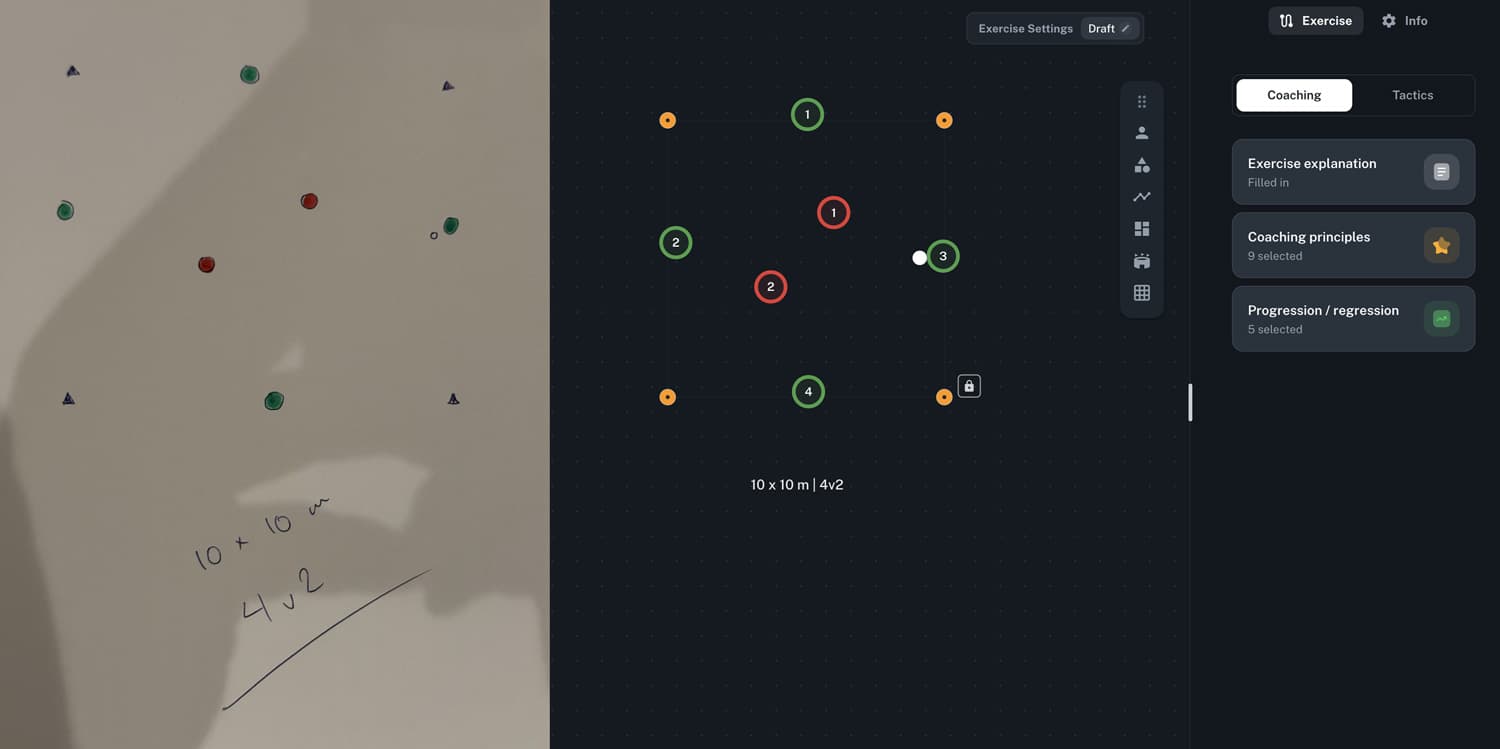
AI Drill Importer: Upload a Photo, Get an Editable Drill
Every coach has been there. You spot a brilliant exercise in a coaching book. A teammate shares a drill on Instagram. You sketch something on the whiteboard during a session that just works. The exercise is great — but getting it into your digital library means starting from scratch. Placing every player, dropping every cone, drawing every arrow, typing every rule. By the time you're done recreating it, the inspiration has faded into admin work.
What if you could just take a photo and have the exercise ready to edit?
Introducing the AI Drill Importer — upload a photo or screenshot of any football exercise, and the AI automatically analyzes the image and recreates it as a fully editable exercise in your library. No manual rebuilding. No tedious redrawing. Just snap, import, and customize.
How It Works
Three Steps, Seconds Each
- Upload — Take a photo or screenshot of any football exercise and upload it to Driblo
- AI Analysis — The importer scans the image, identifies every visual element, and extracts the coaching context behind the drill
- Edit & Save — Review the result on the canvas, make any adjustments, and save it to your exercise library
The result is not a static copy of the image. It is a set of fully editable canvas elements — identical to exercises you create from scratch in the Exercise Designer.
What the AI Sees
Visual Elements on the Canvas
The AI recognizes and places the core building blocks of any exercise:
- Player positions — including team colors, numbers, and groupings
- Cones and markers — standard training equipment placed accurately
- Goals — full-size, mini-goals, and gates
- Pitch markings — field lines, penalty areas, center circles
- Zones — highlighted areas on the pitch
- Movement arrows — passing lines, running paths, dribbling routes
- Dimensions and format — reads measurements like "10 x 10 m" and exercise format like "4v2"
Exercise Intelligence — Beyond the Image
The AI doesn't stop at placing objects on a canvas. It reads the coaching intent behind the image and fills in the metadata that makes an exercise truly useful:
- Exercise explanation — rules and instructions extracted and written out
- Coaching principles — tactical points the drill develops, automatically selected
- Tags — categorization generated for easy library search
- Progression & regression — suggestions for how to make the drill harder or easier
- Focus — automatically determines In Possession or Out of Possession
The AI doesn't just trace the image — it understands the exercise. Visual elements become interactive objects. Written context becomes structured metadata. A static picture becomes a living drill.
Where Your Exercises Come From
The beauty of the importer is that it works with exercises from anywhere:
- Coaching books — Digitize your favorite drills from printed material
- Social media — Screenshot exercises from Instagram, Twitter, or YouTube stills
- Whiteboard sketches — Photograph hand-drawn drills with magnets, markers, or chalk
- PDF handouts — Import exercises shared by coaching education programs
- Other coaching platforms — Bring exercises from older or different tools into Driblo
The AI handles different visual styles — clean professional diagrams, rough hand-drawn sketches, photos of physical setups with real cones and players. It is trained on the patterns of football exercises, not on a single specific format.
Fully Editable, Fully Yours
Every imported exercise is a first-class citizen in your library. It works with every tool in Driblo, just like exercises you build from scratch:
- Add animations to show player movement sequences
- Link to your Style of Play for tactical alignment
- Assign real players with Auto Position
- Plan sessions by dropping the exercise into your training schedule
- Share to the community or keep it private to your club
Nothing is locked. Nothing is read-only. The imported exercise is yours to evolve.
Why This Matters
- Build your library faster — Years of collected exercises from books, courses, and colleagues, imported in minutes
- Never lose a drill again — That whiteboard sketch survives beyond the next training session
- Bridge analog and digital — Physical coaching resources become interactive digital tools
- Focus on coaching, not drawing — Spend your time on tactical decisions, not canvas busywork
The AI Drill Importer is available now in Driblo. Upload a photo, let the AI do the work, and start customizing. Your exercise library just got a lot easier to build.