Share your game plan with the squad through one link
You spent an hour building the game plan for the match. The lineup is set, the press is mapped out, and the situations connect. Then you have to share it — and suddenly it is eight screenshots in the team chat, a PowerPoint nobody opens on a phone, and a photo of the whiteboard that has scrolled out of the thread by Friday.
What if the whole plan opened with one link and a code?
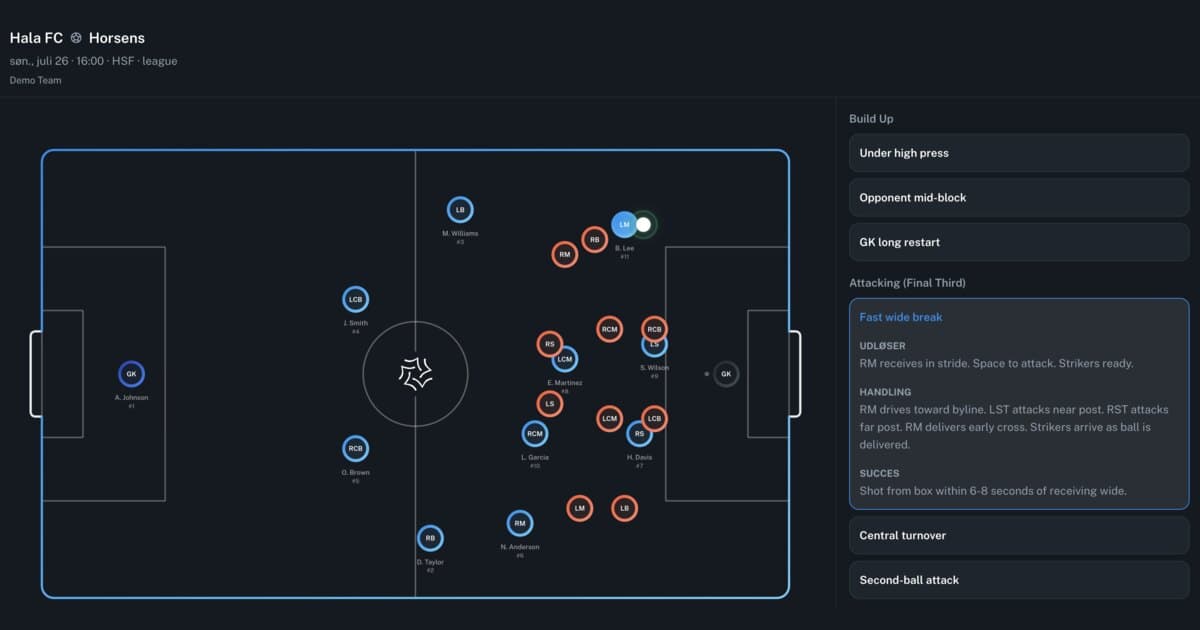
Now it does. With public link sharing you send your game plan as a single link with a 6-digit access code. The recipient taps it, enters the code, and sees the full tactical briefing for the match — lineup, formations, and situations that play out as animations on the pitch. No app. No account. No login.
How it works
Three steps
- Share — Open your game plan on the match in Driblo and tap "Share game plan". You get a private link and a 6-digit code. The dialog also shows a QR code and a pre-written message — "See our game plan here: [link] — Access code: [code]" — that you copy with one click and send to the team group on WhatsApp or Messenger.
- Open — The recipient taps the link and lands on a locked cover page showing the club badge, home or away, venue, and competition. Enough to confirm they are in the right place, without revealing the tactics.
- Understand — They enter the code, and the full game plan opens in read-only view.
There is one active link per match per team. No confusion about which link applies.
What the recipient actually sees
This is where the difference between a link and a screenshot becomes obvious. The recipient does not get a picture of your plan. They get the plan.
- The interactive pitch with the starting lineup and the bench, exactly as you set it up
- All your active formations — click between them and watch the lineup change
- Tactical situations split into in possession and out of possession, grouped into sub-phases
- The full context on every situation — name, description, trigger (when it occurs), action (what we do), and success criteria (when it worked)
Situations play out on the pitch
Click a situation and it plays as an animation. Players, opponents, and the ball move. A midfielder who needs to drop in and collect the ball between the lines is hard to explain in text and impossible to show in a still image. As movement, it takes three seconds to understand.
It is the difference between reading about a pressing trap and watching it spring. A digital tactics board beats the whiteboard photo because the plan moves.
The view is built for mobile, because that is where it gets opened. On a phone the pitch stands vertically with the situations underneath. On tablet and desktop the pitch sits on the left with the tactical sidebar on the right.
You decide who has access
Sharing tactics with players should not mean losing control of them.
- The link alone is not enough. It cannot be guessed, and the code sits on top of it as a second layer.
- Five wrong code attempts lock the link for 15 minutes. Nobody can guess their way in.
- The plan is only loaded once both link and code are approved. Until then the content is not sitting out in the open.
- A new code whenever you want. If the code ended up somewhere it should not, generate a new one. The old one stops working immediately.
- Revoke the link entirely. Also immediately.
- Everything is read-only. Nobody can change the plan through the link.
- Only coaches and club administrators can create, change, and revoke links.
The feature is separate from internal sharing inside the club. This one is for people without a Driblo account.
Four moments where it changes match day
The team chat the day before the match. One link and a code instead of eight screenshots and a 400-word message. Players open it the night before, on the bus, or right before they walk out.
The assistant coach without an account. The goalkeeper coach, the team manager, the volunteer taking the second match of the weekend — they should not need a user account to know what the plan is.
Guest players and players called up from the age group below. A player pulled up for Sunday's match has not been to a single session with your setup. One link gives them the entire briefing, including how you press, before they arrive.
The QR code before kickoff. Put the QR code on a screen or on the dressing room wall. Everyone scans, everyone has the plan on their own phone.
From plan to understanding
A game plan is only worth something if the people executing it understand it. Your style of play sets the framework for how you play, and it is the foundation underneath everything else. The game plan translates that framework into this specific match. The link makes sure the translation reaches the people who have to deliver it on the pitch.
Public link sharing is available now in Driblo. Open a match, build your game plan, and hit share.